1. Background of this research
 Photo by Alexandre Dulaunoy, as found on flickr.
Link to related conference talk recording here.
1.1 What made me start on this
This is a follow up of the code review I did in scope of Hacking for hoodies: MISP edition.
The main reasons I started looking into using agentic AI were the following:
- I wanted to learn more about it, as I had no idea how it worked :)
- Andras Iklody told me it was getting very useful and good in general
- https://vulnerability.circl.lu/vuln/CVE-2026-44380 was found by Jeroen Gui (thank you Jeroen!). This is something I felt I should have caught. Unfortunately I didn’t look at that part of the code because I thought it was only relevant for “old authkeys”, as a result I had left it out of scope for my reviews. One of the motivations for me, was that agentic AI could allow me to broaden the scope of my reviews.
- I was looking for a potential topic to submit to the hack.lu
- As a result I took this research more seriously than I would have otherwise
1.2 Why Rudzik?
- Officially, it’s the cat (and a bug eating bird!)
- He is passionate and talented at hunting bugs, so it also felt appropriate
- Thanks to Koen Van Impe for coming up with the idea to name projects after cats! Check out his Zsazsa project.
1.3 Time scheduling
Projects like these are a hobby for me. I have a full time “day job”, that benefits from this work as well. I do not spend time on the clock on these types of projects, except in exceptional circumstances (and only if there is a direct benefit for my employer).
So what does the time scheduling look like then? During the timeframe I was very actively working on this: I went to work, got home in the evening, and then spent about 3-4 hours hacking away. In weekends this was typically 6 or more hours a day. While it was fun, of course it is not sustainable to always spend that much time on this type of hobby.
1.4 Timeframe and effort spent
The core research was performed between the middle of May 2026, and end of September 2026.
1.5 Costs (money)
 Photo by Alexandre Dulaunoy, as found on flickr
| Product | Amount (Euro) |
|---|---|
| Claude (subscriptions + api credit) | 610.5 |
| Codex (subscriptions) | 207 |
| Jetbrains AI (subscriptions + credit) | 50 |
| Total | 867.5 |
Notes I did attempt to use AI credits for Claude, to connect it to my Jetbrains IDE through Junie. With that method, I spent 70USD credit in half a day, not doing anything super crazy. It felt ridiculously expensive so I will not do it again, and I’d definitely recommend sticking to the subscription models for Antrophic and OpenAI. For other services, credits are sometimes okay (they don’t seem to run at much higher cost vs subscriptions).
1.6 Costs (time)
I estimate I spent about 550 hours on this project.
- +- 200 hours went into looking at Filigran products
- OpenCTI: roughly 150 hours
- OpenAEV
- The rest was divided over a large set of applications, mostly open source projects led by CIRCL
Time division (rough estimates):
- Research and setting up testing environments: 20%
- Finding issues: roughly 40%
- Triaging, exploit development and reporting: 40%
A typical vulnerability to disclosure report effort scale was between:
- 15 minutes for “simple XSS” in MISP reported to CIRCL
- 24 hours for a complex set of issues leading to a critical chain, reported to a vendor I wasn’t as familiar with.
1.7 Applications I reviewed to at least some extent. Being present on this list does not mean I found or reported vulnerabilities for them
The list is ordered descendingly by time I spent on the software, for this and my previous research combined.
- MISP
- Cerebrate
- Vulnerability-lookup
- CTI-transmute
- OpenCTI
- Rulezet
- Flowintel
- AIL-project
- Ransomlook
- Lookyloo
- Pivotick
- Pandora
- Lacus
- OpenAEV
- MISP-stix
- Mercator
- MISP-workbench
- RIFP
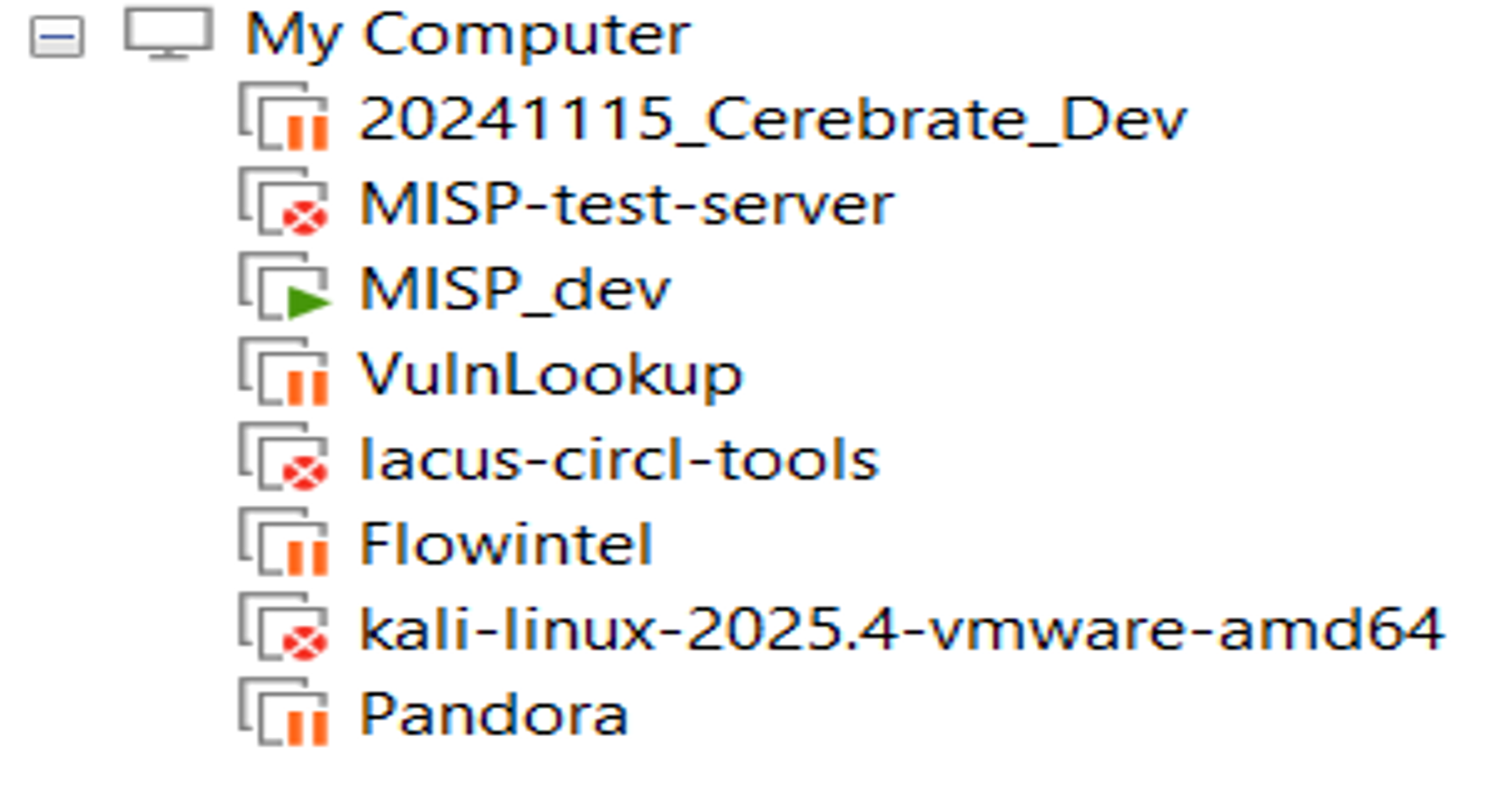
As I had ran most of these applications at least once at some point, this unfortunately led to a bit of a mess in my setup, regularly making me have to figure out on which VM I installed what, and what the credentials were (breaking the apps with exploits didn’t help here):
1.8 Basic approach
- Run automated comprehensive “tool”, for example claude-security
- Run baseline prompts
- (Install and) browse the app
- Continue with hypothesis prompts
- Manually triage, verify, write report
2 Some of my thoughts on risks of AI
2.1 Mental capacity and creativity
My concerns when it comes to the impact on mental capacity and creativity align with the ones voiced in this blog post: A Machine That Dances in Your Place, by Cédric Bonhomme.
2.2. Human relationships
Another major concern I have, and which didn’t show up in that blog post, is the use of “AI” to fill gaps in human relationships. Some of my friends already talk to chatbots about mental health issues, relationships,… They treat the chatbot like a person and have a sort of friendship with them, or more. They call them sweet when they “show” concern through their language use for example.
I am seriously concerned that people will start using AI to fill personal relationship needs, or other similar needs, through AI. This feels wrong to me. As a species, we seem to build and maintain less human connection nowadays, while I believe the opposite is necessary.
3. Developer and vendor interactions
 Photo by Alexandre Dulaunoy, as found on flickr
Please see my initial blog post Hacking for hoodies: MISP edition for core thoughts on this topic. I will just add some new things here…
3.1 Filigran
3.1.1 The positives
- Trial license / instance can be requested. Unfortunately it seems a cloud instance is now the default “trial” for OpenCTI, you don’t get a trial license anymore.
- They fix the reported issues
- Relatively friendly feedback (especially by OpenAEV)
3.1.2 Some constructive feedback
- Communicate more with reporters, especially “trusted” ones
- On multiple occassions, I only received “Thank you for the report, it was accepted.” and when lucky: “The issue has been resolved in patch X, please do not disclose until Y”. This made it difficult for me to give follow up comments, or to know when a patch is released so I can check if the fix is complete.
- Update security policy to reflect reality
- The typical non-disclosure requested was 12 weeks, while the Filigran “official” public policy mentions periods between 2 and 8 weeks
- Triage time is said to be 72 hours, but it was often longer
- Do not just fix the “reported” issue, also look for adjacent issues
- Theorize about full/follow up impact
- On multiple occassions, I had to explicitly show how further legit functionality could be used for further impact, even for scenarios that should be obvious to the core developers
3.2 CIRCL
It has always been a positive experience to work with CIRCL, and it continues to be. Due to high amount of reports, they sometimes had a longer triage and fix time than before, but they were open about that.
As I noticed earlier, how to report and follow up on findings, should be tailored to the people you report to. A couple of examples:
- Some developers will take a report, and look for similar issues themselves
- Others will just fix what is reported
- Solution: already do the extra digging yourself or indicate the scope of the issue might be larger
- Some developers (especially junior) will assume everything I report has to be fixed, even though I said something still needs to be reviewed
- Others will always do their own assessment
- Solution: do extra triaging, send the finding to a more senior dev if it makes sense, add extra communication…
- Some already have knowledge about how to deal “technically” with certain vulnerabilities (e.g. security headers, SSTI), other’s don’t.
- Giving extra info, especially to more junior devs, is useful in this case
- This can be challenging, because you can easily take this too far an create an information overload
3.3 Olivier Ferrand (Ransomlook)
Great to work with! Also: you are doing awesome stuff, man ;)!
3.4 Generic notes
3.4.1 Reporting and follow up efforts
As mentioned earlier, building a good report can take a significant amount of time, especially for issues that are more technically complex, or that require a more complex exploit chain.
These are my personal goals when it comes to reporting:
- Only report issues I would personally be concerned about / want to receive a report of, unless I know the preferences of a developer and they are different
- Minimize the time needed by a triager and developer to understand the issue, and think of a solution to fix it
- Provide a working, tested reproduction scenario. Note any “conditions” required (example: setting x needs to be enabled)
- Be neutral and fair in the CVSS assessment
- If I don’t understand some part, or how to fix an issue, be honest about it. Adding an incorrect assessment can do more harm than good
- Be understanding and factual, leave out “emotions”, saying things like “how is it possible you introduced an issue like this?” is not helping anyone
3.4.2 To report or not report, that is the question
There’s a lot of issues that are benign, or would likely never be successfully exploited. Sometimes AI also claims there are issues, when you can’t reproduce it.
My approach?
- I can’t reproduce or I don’t have time to dig into it, but the issue looks valid: I report it if I know the developers would appreciate that.
- If it is likely not exploitable, but still not “clean”, reporting depends on two things (I would not request a CVE in most scenarios here):
- Whether future modifications elsewhere would likely “open the gate” and make this exploitable
- The preference of the developer. I know some of them simply like to fix them anyway.
- If possible, have some scheduled meetings with devs to go over prior “discarded” findings, to align
4. LLM security review prompting guide
4.1 The tools
- Claude code or Codex
- Your favorite debugger
- Ideally, a test instance of the app
- The source code of the app you are reviewing
Note: There are also existing Claude commands like https://code.claude.com/docs/en/claude-security and /code-review:
- /claude-security is very good (I typically run it on high). It finds things I didn’t find with below approach and vice-versa. You can run it and just sit back. It eats a lot of tokens (20-30% of claude max x20 weekly for MISP sized projects), and often takes a long time though (+-8 hours).
4.2 The setup
- The tools above, deployed on a VM
- Cloned repositories of the things you want to review
4.3 Example prompt list
Note: I typically ask to report the results in a folder called llm_findings, if you want the same, add ‘Finish by writing a report in folder llm_findings.’ to each prompt, or start with ‘For all future prompts, write a report in folder llm_findings’
All prompts are run from the main project folder. So after cloning project X for example:
cd X
claude # or codex
4.3.1 Baseline prompts
- Systematically review the views of this application. Look for potential XSS issues.
- Systematically review the non-vendor javascript files in this application. Look for potential XSS issues.
- Systematically look for broken ACL issues in this application.
- Systematically look for potential privilege escalation issues in this application.
- Systematically look for potential mass assignment issues in this application.
- Systematically look for potential excessive data exposure issues in this application.
- Systematically look for potential path traversal issues in this application.
- Systematically look for potential remote code execution issues in this application.
- Systematically look for potential injection issues in this application.
- Note: in this case Claude code will also cover some of the previous points (traversal, …)
- Systematically look for issues related to authentication in this application.
- Review the security headers set by this application (including CORS). Report any issues.
- What other types of vulnerabilities should this application be reviewed for? Make a plan to look for those, divide the work into steps. Write the plan to a file in the llm_findings folder, and also use it to keep track of progress. Start with step 1, and ask to continue after finishing each step.
For stuff like JavaScript libraries if you have no idea what to look for:
Analyze the code in this folder. What type of vulnerabilities should this application or library be reviewed for? Make a plan to do so, divide the work into steps. Write the plan to a file in the llm_findings folder, and also use it to keep track of progress. start with step 1, and ask to continue after finishing each step."
4.3.2 The secret sauce
I’ve had better results splitting up the XSS reviews like in the prompts above. I have the impression javascript libraries are often overlooked in normal pentests as well.
Ask follow up questions when things look promising, or might have been “overlooked”.
Some things Claude and Codex don’t seem to “find” on their own, even if you ask them to make a plan, and a follow up plan, and another follow up plan.
- Systematically look for logic errors that could cause security issues in this application.
- This often leads to very interesting findings, which require knowledge of the application to determine impact of. That also means it’s sometimes difficult for me as non-core dev to do proper review of those.
- Sometimes you need to nudge extra to focus on boolean logic errors etc…, I believe that depends on prior session context
- Functionality x exists in this application, could this be abused by an attacker? Check the existing code to validate.
- Systematically look for business logic errors that could cause security issues in this application.
This turns the work into reseach + hypothesis review. It seems a lot of people are running the baseline tooling, but do not dig further into the application, and don’t look for less commonly known vulnerability patterns.
4.3.3 Side notes
- I never encountered context window issues, despite running quite a lot of prompts in certain sessions. The biggest code bases I reviewed were probably MISP and OpenCTI.
- Claude still rejects requests to make proof of concept payloads in a lot of situations, e.g. I had to make those manually, or at least modify base payloads:
- User enumeration exploit script (script injection vulnerability)
- Webshell deployment
- …
- Weirdly, in some other situations it happily does so
- Defacement template
- Phishing overlay page
5. Things agentic AI shines at
5.1 PoC development & giving advise on impact!
Some vendors really stress the need to demonstrate the full impact. You can prompt AI to help with proof of concepts, and to explain the impact.
An example is the creation of Phishing overlay pages. Some applications are vulnerable to form and CSS injection, this allows you to craft a payload, that when visiting a certain page, displays a phishing overlay page in the legitimate app:
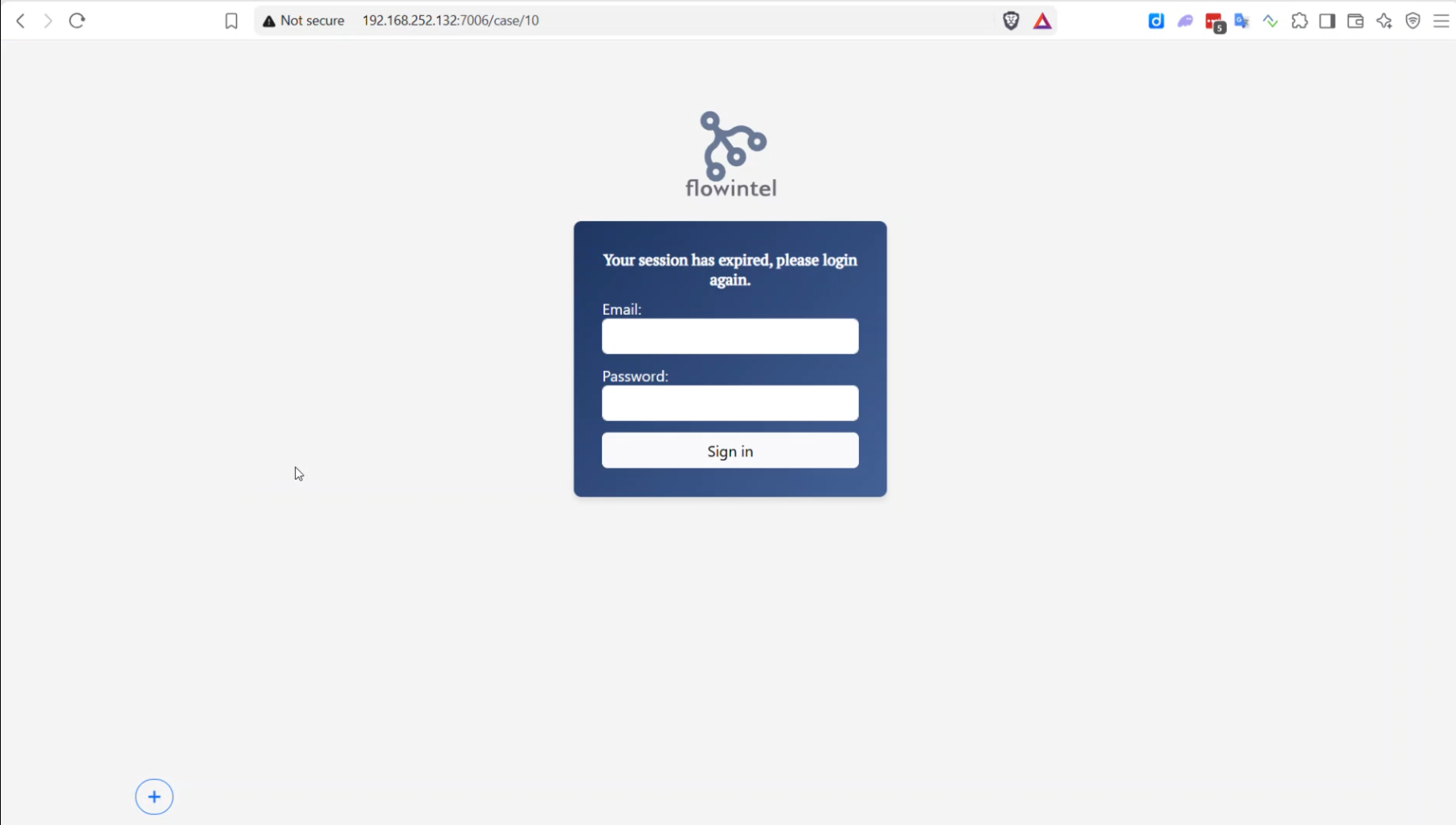
In the above example, the AI agent took only 5 minutes to create the original phishing overlay payload. The follow prompt (to fix an issue with the logo) led to this result, and took only 3 minutes to process. 8 minutes total time to build a working PoC, that looks nearly identical to the original login page.
5.2 Discovering ways to bypass a security measure
Sometimes you have a hunch something somewhere is exploitable, but you can’t figure out a way to do it. Ask your agent!
Two examples:
- An arbitrary file read in Rulezet, due to insecure handling of symbolic links in pulled in git repos
- A first patch attempt to fix the Latex injection mentioned below, was bypassable. The agent gave multiple options. Further follow up also made a cleaner version of my initial proof of concept payload.
5.3 Chaining attacks
Example: low privilege access to RCE in flowintel:

Vulnerabilities:
- cve-2026-81659 -> note: the first version of this was found without AI usage
- cve-2026-81743
5.4 Making a plan for “what to look at”
Sometimes you are dealing with applications that do things you’ve never thought about before. An example: RIFP radio image sender and receiver.
You can still make a plan and dig into these, either manually or with agentic AI, by running a prompt like this as mentioned earlier:
Analyze the code in this folder. What type of vulnerabilities should this application or library be reviewed for? Make a plan to do so, divide the work into steps. Write the plan to a file in folder , and also use it to keep track of progress. start with step 1, and ask to continue after finishing each step.
6. Consolidated findings
6.1 Stats per product
| Product | Critical | High | Medium | Low | Unknown | Total |
|---|---|---|---|---|---|---|
| misp:misp | 4 | 15 | 38 | 0 | 0 | 57 |
| ransomlook:ransomlook | 4 | 8 | 1 | 0 | 0 | 13 |
| flowintel:flowintel | 1 | 5 | 6 | 0 | 0 | 12 |
| misp:cti-transmute | 0 | 4 | 11 | 1 | 0 | 16 |
| pandora-analysis:pandora | 2 | 2 | 1 | 0 | 0 | 5 |
| pivotick:pivotick | 1 | 2 | 4 | 0 | 0 | 7 |
| ail-project:ail-framework | 0 | 4 | 6 | 0 | 0 | 10 |
| misp:misp-stix | 0 | 2 | 1 | 0 | 0 | 3 |
| cerebrate:cerebrate | 0 | 1 | 1 | 0 | 0 | 2 |
| lookyloo:lookyloo | 1 | 0 | 0 | 0 | 0 | 1 |
| MISP:misp-stix | 0 | 0 | 1 | 0 | 0 | 1 |
| Undisclosed | 1 | 0 | 0 | 0 | 26 | 27 |
| TOTAL | 14 | 43 | 70 | 1 | 0 | 154 |
6.2 CVE references (127). Building this list was made possible by CIRCL’s vulnerability-lookup
- CVE-2026-112188: MISP Server Settings Lookup Exposes Sensitive Configuration Data via Branch Name Resolution
- CVE-2026-112184: MISP Workflow Module: Reflected XSS via Unescaped misp-modules Parameter Names in Form Labels
- CVE-2026-104908: MISP Decaying Model Import Mass Assignment Allows Cross-Organization Model Overwrite and Default Flagging
- CVE-2026-104907: MISP: JavaScript Injection via Remote Tag ID in Event Preview Inline Handler
- CVE-2026-104906: MISP TAXII Object Viewer Stored XSS via Unescaped JSON Output
- CVE-2026-104901: MISP ID Translator: Unescaped Remote Event ID Enables Cross-Site Scripting via Linked Server
- CVE-2026-104900: MISP Stored XSS via Unescaped Count Field Value in Remote Event Preview Index
- CVE-2026-103664: MISP Reflected Cross-Site Scripting via Unsanitized Analyst Data Seed Parameter
- CVE-2026-103237: MISP: Nested Model Alias Key Bypasses Sanitization to Modify Cross-Tenant Rows
- CVE-2026-103239: MISP Tag Collection Save Allows Privilege Escalation via Sibling Model Injection
- CVE-2026-103388: MISP Stored Cross-Site Scripting via JavaScript URL in Galaxy Cluster Source Field
- CVE-2026-103389: MISP Stored Cross-Site Scripting via Unvalidated Galaxy Icon Field in Correlation Graph
- CVE-2026-103235: MISP Event Delegation Mass Assignment Allows Retargeting Delegation to Arbitrary Events
- CVE-2026-100190: Stored Cross-Site Scripting (XSS) via Crawler Capture Import in AIL Framework showDomain Page
- CVE-2026-100172: Stored XSS in AIL Framework extracted-match popovers via unescaped dynamic values in HTML-enabled data-content attributes
- CVE-2026-100174: Stored Cross-Site Scripting (XSS) in AIL Framework Tag Selector via Unescaped Tag Names
- CVE-2026-100176: Stored Cross-Site Scripting (XSS) in AIL Framework Username Timeline Tooltip
- CVE-2026-100177: Ail Framework Crawler: Missing Cookiejar Authorization Check Allows Cross-Organization Cookiejar Attachment
- CVE-2026-100187: AIL Framework Onion Module: Non-Onion URL Accepted as Crawler Task Due to Bypassed Domain Validation
- CVE-2026-95659: MISP Reflected XSS via Unvalidated Object Type in AnalystData Overmind Thread
- CVE-2026-95661: MISP Reflected Cross-Site Scripting in Attribute Histogram via Unescaped URL-Supplied Type List
- CVE-2026-95671: MISP Collections: Missing Authorization Check for Sharing Group on PUT Request in collections/add
- CVE-2026-95674: MISP EventsController queryEnrichment allows querying unavailable or legacy modules without validation
- CVE-2026-95682: MISP Stored Cross-Site Scripting via Unescaped Organization Name in Admin Email View
- CVE-2026-95683: MISP Overmind Event View Discloses Report Content Bypassing Report-Level ACL
- CVE-2026-95685: MISP Missing Authorization on replaceSuggestionInReport Event Report Action
- CVE-2026-95693: MISP Information Disclosure via Forged Upload Path
- CVE-2026-95697: MISP: Insufficient Authorization Allows Sharing Group Editors to Overwrite Organization Metadata
- CVE-2026-95698: MISP Path Traversal in OrgImgHelper findOrgImage via Crafted Organization Name
- CVE-2026-95701: MISP Path Traversal via Organization Name in Org-Statistics Logo Check
- CVE-2026-93296: MISP Overmind: Stored Cross-Site Scripting via Unescaped Object Names in Statistics Legends
- CVE-2026-94372: Stored Cross-Site Scripting via Unescaped Galaxy Cluster Tag Names in MISP Default Theme Galaxies Index
- CVE-2026-94373: MISP DOM-based Cross-Site Scripting via innerHTML in Contextual Menu
- CVE-2026-94374: MISP: IDOR via Client-Supplied Report ID in Module Results Processing Allows Reparenting and Overwriting of Other Events’ Reports
- CVE-2026-94379: MISP: HTTP Method Bypass of Login Security Controls (Bruteforce Protection and Email OTP)
- CVE-2026-94393: MISP Event Report Cross-Event Reparenting via Unscoped UUID Resolution in editReport
- CVE-2026-94381: MISP Privilege Escalation: Read-Only API Key User Can Regain Full Role via updateLoginTime
- CVE-2026-94383: MISP Blocklist Workflow Module: Arbitrary Script Execution via Unrestricted File Extension
- CVE-2026-94394: MISP ObjectReferencesController: Granular Distribution and Sharing Group Restrictions Bypassed When Adding Object References
- CVE-2026-94404: MISP CSRF vulnerability allows unauthorized attribute modification
- CVE-2026-94277: Stored Cross-Site Scripting in MISP Galaxy Matrix Statistics via Unescaped Galaxy Name
- CVE-2026-88069: Path traversal in Pandora archive extractor allows arbitrary file writes outside the extraction directory in pandora analysis
- CVE-2026-81817: Flowintel Missing Task-to-Case Authorization Allows Cross-Case Task Modification
- CVE-2026-81818: Flowintel Organization Administrator Can Reset Full Administrator Password and Escalate Privileges
- CVE-2026-81819: Flowintel Missing Authorization Allows Regular API Users to View Other Users’ Task Assignments
- CVE-2026-81820: Flowintel HTML Injection in MISP Case History Timeline via Crafted Object Attributes
- CVE-2026-81826: Flowintel Fails to Invalidate Active Sessions After Password Change
- CVE-2026-81827: Flowintel Login Email Validation Bypass Allows Log Injection via Crafted Email Input
- CVE-2026-81659: Flowintel Note PDF Export Allows Arbitrary Local File Read via Pandoc/XeLaTeX Processing
- CVE-2026-81753: Flowintel Stored XSS in Case Notes via Malicious Mermaid Diagram Content
- CVE-2026-81662: Flowintel Alert Settings Configuration Allows Remote Code Execution via Arbitrary Configuration Keys
- CVE-2026-81743: Flowintel Arbitrary Log File Path Allows Remote Code Execution via Template Injection
- CVE-2026-81814: Flowintel Stored XSS in Calendar via Malicious Case Title
- CVE-2026-77751: Path Traversal in MISP Object Template Resolution During STIX Import and Export in misp-stix library
- CVE-2026-78551: RansomLook Login Endpoint Allows Timing-Based Username Enumeration and Unthrottled Authentication Attempts
- CVE-2026-78553: Insecure Flask Secret-Key File Permissions Allow Local Administrator Session Forgery in RansomLook
- CVE-2026-78555: RansomLook API Key Disclosure Through /admin/apikeys HTML Source
- CVE-2026-78369: Missing Authentication Allows Unauthorized Creation of Crypto Groups in RansomLook
- CVE-2026-78370: RansomLook Unauthenticated Database Export Exposes Private Data
- CVE-2026-78372: RansomLook Missing Authorization Allows Disclosure of Private Group and Ransom Note Data
- CVE-2026-78378: Redis Glob Pattern Injection Allows Unauthorized Enumeration of Private Ransomlook Data
- CVE-2026-78380: Private Group and Market Posts Disclosed Through Public Notification Channels in RansomLook
- CVE-2026-78381: RansomLook Arbitrary File Read via Path Traversal in Post screen Field
- CVE-2026-78385: RansomLook Analysis PDF Generation Allows Server-Side Request Forgery and Arbitrary Local File Access
- CVE-2026-78386: Unauthenticated Disclosure of Scraping Credentials and Bypass Configuration via RansomLook API
- CVE-2026-78387: RansomLook Missing Authorization in Web Configuration Editor Allows Application Configuration Modification
- CVE-2026-78391: Stored Cross-Site Scripting via Untrusted Cryptocurrency Address Rendering in RansomLook
- CVE-2026-77710: STIX2 Parser Confusion and Mass Assignment Allow Unauthorized MISP Attribute Metadata Injection in misp-stix library
- CVE-2026-77755: Denial of Service in MISP-STIX Import via Malformed or Oversized STIX Documents in misp-stix library
- CVE-2026-77761: Cross-Document Parser State Contamination in misp-stix
- CVE-2026-75531: Stored Cross-Site Scripting in URL Observables via Lookyloo Submission Handler in Pandora
- CVE-2026-75529: Stored Cross-Site Scripting via MIME-Type Confusion in PDF Downloads of Pandora
- CVE-2026-74764: Path Traversal in TAR Archive Extraction Allows Arbitrary File Write in Pandora
- CVE-2026-74767: Unbounded DAA Decompression in Pandora Allows Denial of Service via Decompression Bomb
- CVE-2026-73161: cti-transmute Conversion Table Allows XSS via Unescaped Cell Content During Search Highlighting
- CVE-2026-73162: cti-transmute CSRF Allows Unauthorized Follow and Notification State Changes
- CVE-2026-73140: cti-transmute Evaluation Report Exports Expose Private Comments and Author Information
- CVE-2026-73155: cti-transmute Missing Authorization Allows Reactions to Private Comments
- CVE-2026-73156: cti-transmute Sunburst and Treemap Tooltips Allow Cross-Site Scripting via Crafted Conversion Data
- CVE-2026-73157: cti-transmute Remote MISP Event Browser Allows Cross-Site Scripting via Malicious Event Metadata
- CVE-2026-73158: cti-transmute Saved Graph Configuration Allows Stored Cross-Site Scripting via svgIcon
- CVE-2026-73159: cti-transmute Stored XSS via Crafted Tag Icon on Admin Triage Interface
- CVE-2026-73160: cti-transmute Unauthenticated SSRF via Hostnames Resolving to Internal IP Addresses
- CVE-2026-72751: Stored Cross-Site Scripting in CTI-Transmute Conversion Graph via Malicious STIX/MISP Content
- CVE-2026-72759: cti-transmute Conversion History Authorization Bypass Leads to Sensitive Data Disclosure After Conversion Deletion
- CVE-2026-72760: cti-transmute Following List Exposes User Email Addresses to Authenticated Users
- CVE-2026-71502: Unauthenticated Stored Vue Template Injection Leads to Cross-Site Scripting in CTI-Transmute
- CVE-2026-71447: Stored Cross-Site Scripting in Chat and Forum Translation Controls in ail-framework
- CVE-2026-71445: Authenticated Reflected Cross-Site Scripting in Tag Error Responses in ail-framework
- CVE-2026-71446: Stored Cross-Site Scripting in AIL Framework Domain Screenshot View
- CVE-2026-69075: Stored Cross-Site Scripting via Vue Template Injection in FlowIntel
- CVE-2026-69078: Server-Side Request Forgery and Local File Disclosure in CTI-Transmute Evaluation PDF Rendering
- CVE-2026-69079: Unauthenticated Denial of Service via Unbounded Activity-Timeline Range in CTI-Transmute
- CVE-2026-69082: Cross-Site Request Forgery in the Administrative User Deletion Endpoint
- CVE-2026-66920: Pivotick - Stack Exhaustion Denial of Service via Deep or Cyclic Graph Data
- CVE-2026-66919: Stored DOM-Based Cross-Site Scripting in Node Modal Headers
- CVE-2026-66918: DOM-Based Cross-Site Scripting via Unsanitized SVG Node Icons
- CVE-2026-66824: Stored Cross-Site Scripting via Unsafe Capture Tree JSON Embedding
- CVE-2026-67174: DOM-Based Cross-Site Scripting via Unsafe String and SVG Icon Rendering in Pivotick
- CVE-2026-67178: Open Redirect in MISP Installer-Generated Apache Configuration
7. Acknowledgements
Thank you CIRCL and colleagues, for the awesome collaborations and the follow up work. Thank you for the nice conversations as well.
Thanks to all triagers and developers, who looked at my reports and developed fixes.
Thanks to my family for being supportive, and being willing to share me with the open source community!
8. Thanks for reading!
Feel free to reach out in case you want to discuss these topics.